
null
Sound Design Basics 101 [LEARN SOUND DESIGN IN FL STUDIO]
How to Use Sylenth1, Serum and Pigments 2 to Learn Sound Design, Make Beats, and Create Your Own Signature Sound.
All Levels • 12 Lectures • Full Lifetime Access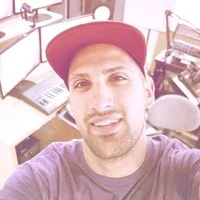
Verified Master Instructor
![Sound Design Basics 101 [LEARN SOUND DESIGN IN FL STUDIO]](/_next/image?url=https%3A%2F%2Fcdn.lucebra.com%2Fmedias%2Fcourses-media%2Fcourse-sound%2520design%2520basics%2520101%2520%255Blearn%2520sound%2520design%2520in%2520fl%2520studio%255D-thumbnails%2FSRaM0pzGdJ4iKOseUyxUD8kmhhEYppmOdS5b2PeUXmcxmTAEEiPle2rUP0MmKTukeJOWepbQapPI1Sr7KQWw4g.png&w=1920&q=80)
TRAILER
Meet your instructor: Riley Weller GratuiTous
19 ms
5.0 / 5.0
Global Rating2h 3m
Total ContentWhat you will learn
How to Sound Design Your Own Presets On ANY SYNTH!
The Three Basic Principles of Sound Design
How to Create Presets for Your Beats
Molding/Shaping a Sound EXACTLY As You'd Like
Course Content
4 sections • 12 lectures • 02:03:15 total lengthBasic Waveforms
Free Preview
08:39
Different Types of Synthesis
12:42
Synthesis Types [Listening]
12:21
Envelopes Explained [Drawing Board]
07:44
Envelopes [Listening Example]
09:31
Oscillator Knobs Explained
12:55
Envelopes For Creative Purposes
12:18
Filters for Power
10:32
Bonus Video [Beatmaking Example]
12:47
Weekly Study Plan
Plan Your Learning Journey
AI generates a personalized schedule based on your availability5 hrs/week
Requirements
We use FL Studio, Sylenth1, Serum, and Pigments 2 to teach sound design, but, you do not need them to learn sound design. (This course teaches you the basics, so you can pick up any synth, and have a good general understanding of how it works.)
Target Audience
Producers wanting to learn sound design
Audio engineers wanting to create their own sounds from scratch with any synth
Beatmakers wanting to create their own signature sound
Sound designers wanting to create their own preset packs to sell them and make passive income!
About this course
Welcome to Sound Design Basics 101!
After many years of being a producer, as well as creating these online music production courses teaching about FL Studio..
I finally released my first sound design course.
Sound design has always been something that felt overwhelming for me.
And honestly, I’ve always found sound design to be boring and tiring whenever I’ve tried to learn it.
To force myself to learn sound design, I started releasing FREE Preset banks for Serum, Sylenth1, and Pigments, and my sound design has been downloaded over 50,000 times!
I thought it was time to share what I’ve learned, and how to apply sound design into your own beats!
I use Serum, Sylenth1, and Pigments to teach this course, but you do not need them. They’re only used as a visual aid to help make things easier to understand.
In this course, I’ll teach you the 3 Basic Fundamentals of Sound Design.
Once you understand these three basic principles, you can literally pick up any synth and have a general idea of how things work.
After receiving a lot of awesome feedback from my own sound design, let me show you how!
If you’re ready to get started, let’s do it!
Enroll, and I’ll talk to you inside.
Career Opportunities & Job Roles
Build practical, job-ready skills and qualify for high-impact roles worldwide
Job-Ready Curriculum
Target Roles You Can Apply For
Professional Music Producer
Commercial Audio Mixing Engineer
Sound Designer & Media Specialist
Mastering & Post-Production Director
Estimated Annual Salary
$55,000 – $110,000 / yr
Global Industry Demand
High Demand in Media & Streaming
In-Demand Skills You Master* Estimates based on global tech hiring benchmarks and industry compensation reports.
Acoustic Balance & Spatial Panning
Dynamic EQ & Harmonic Saturation
Commercial Loudness & Streaming Standards
Creative DAW Workflow & Synthesis
Meet your instructor
Riley Weller GratuiTous
Main Instructor
FL Studio Teacher and FL Studio Expert
GratuiTous (Riley Weller) is an artist and producer for the name of Jesus. He is an author, educator, and podcast host of 'Music Production Made Simple'.
He has been using FL Studio since 2009, leading him to work with a GRAMMY-Nominated Artist!
He has tons of FL Studio Books and FL Studio Courses for how to use FL Studio. His learning materials have proven results from previous students who have successfully learned the software to make beats.
His students tell him that his approach to explaining topics is extremely easy to understand.
Feel free to reach out to GratuiTous with any questions you have about FL Studio....
Students also bought
Learners who viewed this course also enrolled in these top-rated courses

Music | Music Composition
Compose Epic Music Soundtracks Scores For Film, TV, & Video Games. Master Orchestration With Software. Be A Composer.
5.0
4h 30m
36 lectures
All
$19.99
![Sound Design Basics 101 [LEARN SOUND DESIGN IN FL STUDIO]](/_next/image?url=https%3A%2F%2Fcdn.lucebra.com%2Fmedias%2Fcourses-media%2Fcourse-sound%2520design%2520basics%2520101%2520%255Blearn%2520sound%2520design%2520in%2520fl%2520studio%255D-thumbnails%2FSRaM0pzGdJ4iKOseUyxUD8kmhhEYppmOdS5b2PeUXmcxmTAEEiPle2rUP0MmKTukeJOWepbQapPI1Sr7KQWw4g.png&w=1920&q=75)
Music | Music Techniques
How to Use Sylenth1, Serum and Pigments 2 to Learn Sound Design, Make Beats, and Create Your Own Signature Sound.
5.0
2h 30m
11 lectures
All
$59.99

Music | FL Studio
Learn How to Create Beats in FL Studio Like a Pro in 10 Easy Steps - Beginner and Intermediate FL Studio Video Tutorials
5.0
8h 30m
25 lectures
All
$39.99
![FL Studio Beginners Course [Learn FL Studio Basics]](/_next/image?url=https%3A%2F%2Fcdn.lucebra.com%2Fmedias%2Fcourses-media%2Fcourse-eydsez6obgqg48suqnuvv1zcncxddmlp-thumbnails%2FsqZrAhOX2oPMUZnDTsA27mnRRmKWw1mUu6O9OCnnwAWya5IN34lJR6wbrutmV3xPFGY2UI9tmbw8PsAuaQ0Q.png&w=1920&q=75)
Music | FL Studio
Learn how to create beats in FL Studio in this step-by-step course breaking down everything necessary to make beats.
5.0
4h 30m
19 lectures
All
$19.99

Music | Music Fundamentals
Become a Professional Beatmaker by Learning the Inside Secrets.
5.0
3h
29 lectures
All
$44.99

Music | Music Composition
Learn to make professional beats from scratch in this 9-hour step-by-step course! Master melodies, drum loops, mixing, mastering, and arrangement with GratuiTous, a beatmaking expert with 13+ years of experience. Perfect for beginners and experienced producers alike!
5.0
9h 30m
24 lectures
All
$99.99
Frequently Asked Questions
Find answers to the most common questions about this course.
Yes! Upon completing 100% of the course lectures and assignments, you can instantly download your verified digital Certificate of Completion directly from your Lucebra profile.
Explore More in Technology
Expand your learning journey with accredited certificates, related digital books, and live interactive classes.