Official OpenAI Plugin • Version 1.0.6 Live
Traditional AI plugins only return plain text. Lucebra delivers a full-featured, sandboxed interactive video player widget directly in your ChatGPT conversation.
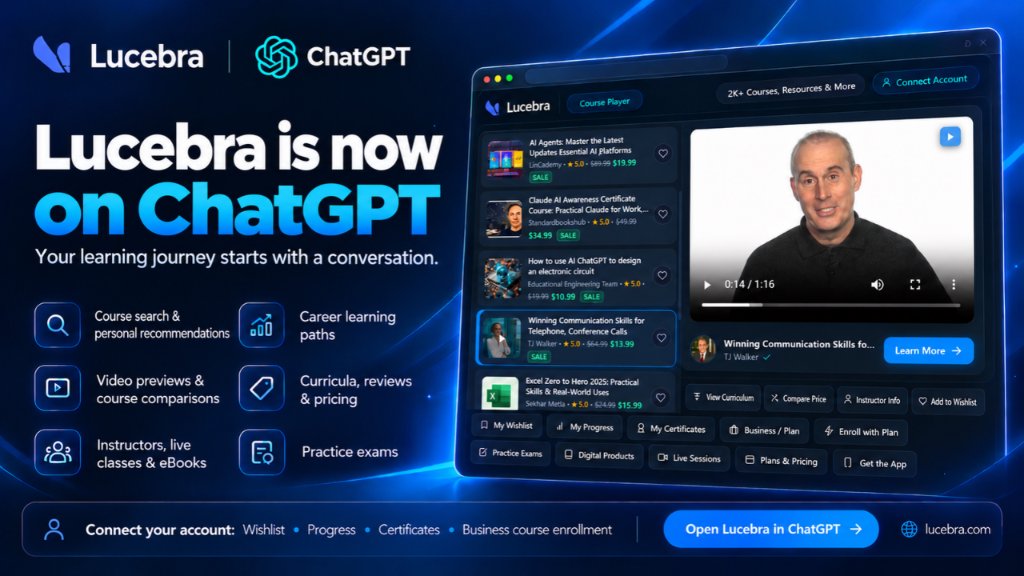
Experience the live Course Player widget in your ChatGPT chat right now.
Launch on ChatGPTNo complex setup or software installations. Follow these 3 simple steps to integrate Lucebra directly into your ChatGPT workspace.
Click “Try on ChatGPT” to open Lucebra and start exploring.
Ask naturally: “Find AI courses for work,” “Help me improve my communication skills,” or “Build a Python learning path.”
Watch course previews, explore curricula, and compare your options—all within ChatGPT. Continue on Lucebra when you’re ready to enroll.
From AI-driven course search to sandboxed video player widgets, explore the full power of Lucebra integrated into ChatGPT.
Search across 2,000+ verified courses by topic, skill level, or learning goals with authentic ratings, student enrollment counts, and live discounts.
Experience sandboxed interactive learning cards. Watch high-definition lesson previews and video trailers right inside your ChatGPT response.
Inspect comprehensive lecture breakdowns, section titles, and total video durations before making an enrollment decision.
Connect with globally recognized educators like Dr. Peter Alkema, TJ Walker, and Sekhar Metla with verified bios, ratings, and course catalogs.
Scan an instant QR code to link your individual or Corporate LMS account to access your wishlist, certificates, and $0.00 team plan enrollments.
Explore practice mock exams, question banks, passing score criteria, downloadable instructor ebooks, and verified certificate credentials.
Copy a prompt and try it in ChatGPT with Lucebra selected.
Artificial Intelligence
“Find practical AI courses to help me work smarter.”
Publicly available • Zero login required
Leadership & Soft Skills
“Find courses to improve my communication and leadership skills.”
Publicly available • Zero login required
Programming & Tech
“Build a step-by-step learning path for Python with real projects.”
Publicly available • Zero login required
Project Management
“Find beginner project management courses, show a video preview, and compare the best options.”
Publicly available • Zero login required
Accreditation
“What certification exams are available on Lucebra, and how do they work?”
Publicly available • Zero login required
Learning Analytics
“Show my Lucebra learning progress and help me choose what to study next.”
Requires a connected Lucebra account.
Career Development
“Find courses to improve my communication, teamwork, and leadership skills.”
Publicly available • Zero login required
Pricing & Plans
“Compare Lucebra Personal, Team, and Enterprise plans, including pricing and billing options.”
Publicly available • Zero login required
Enterprise LMS
“How can Lucebra Enterprise LMS help my company manage employee training and track progress?”
Publicly available • Zero login required
Personal Account
“Show my Lucebra wishlist and help me choose a course for my learning goals.”
Requires a connected Lucebra account.
Course Enrollment
“Show my enrolled Lucebra courses, my progress, and what I can continue learning.”
Requires a connected Lucebra account.
Credentials
“Show the certificates I’ve earned on Lucebra and their verification links.”
Requires a connected Lucebra account.
Account Connection Note: Public exploration of Soft Skills, Plans & Pricing, and Enterprise LMS does not require an account connection. Inquiring about company-specific licenses or team access permissions requires a connected account. Wishlist, Progress, and Certificates cards require a connected Lucebra account.
Add Lucebra to ChatGPT today and explore 2,000+ courses, interactive previews, and real-time curricula right in your conversations.
Open Lucebra on ChatGPT