

Lucebra
Lucebra Business
IT & Software/Other IT & Software

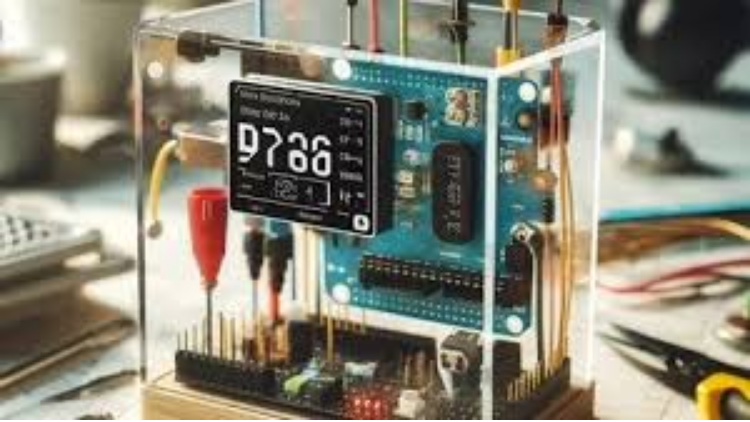
Arduino Weather Station: Step By Step Guide

Stwórz własną stację pogodową z wykorzystaniem Arduino i uzyskaj temperaturę, wilgotność oraz czas w swoim domu w krótkim czasie

All Levels • 12 Lectures • Full Lifetime Access
Educational Engineering Team

Verified Master Instructor

Stacja Pogodowa Arduino: Przewodnik Krok po Kroku
TRAILER
Meet your instructor: Educational Engineering Team

19 ms

5.0 / 5.0
Global Rating
1
Active Students
English (US)
99 Languages Subtitles
1h 24m
Total Content

What you will learn

Zbuduj własną stację pogodową
Używaj i poznaj więcej o Arduino
Używaj i poznaj czujnik temperatury i wilgotności
Kodowanie różnych modułów takich jak LCD, DHT11 i RTC

Course Content

8 sections • 12 lectures • 01:24:14 total length

Introduction

02:35

Things Used in this Project - Hardware

02:51

Things Used in this Project - Software and Web Editor

07:53

Temperature and Humidity Sensor Wiring

04:09
Weekly Study Plan
Plan Your Learning Journey
AI generates a personalized schedule based on your availability

Requirements

Podstawowe doświadczenie w elektronice

Gotowość do zastosowania, nie tylko oglądania

Target Audience

Electronics Geeks

Arduino Geeks

Anyone interested in making amazing electronics Projects

Anyone interested in making amazing Microcontroller Projects

About this course

>>> Ten kurs poprowadzi Cię krok po kroku, jak stworzyć własną stację pogodową Arduino, która będzie rejestrować temperaturę, wilgotność, czas i datę za pomocą wyświetlacza LCD Crystal i płytki Arduino. <<<


Dlaczego warto wziąć udział w tym kursie?


  • To szczegółowy przewodnik krokowy po projekcie.
  • Odkryj podstawy programowania Arduino do rejestracji danych pogodowych.
  • Dowiedz się o różnych zmiennych w Arduino.
  • Zaprogramuj własną płytkę Arduino do rejestracji danych.
  • Naucz się współpracować z komputerem PC lub urządzeniem mobilnym za pomocą komunikacji szeregowej.
  • Stwórz interaktywną stronę internetową, która wyświetla dane zebrane z czujników Arduino.
  • Ten kurs pomoże Ci stworzyć kompletną stację pogodową w domu.

>>> Ciągłe aktualizacje <<<


PONAD 900 STUDENTÓW!!! DZIĘKUJĘ!!!


Co mówią studenci:


Joan Davis mówi: "Bardzo precyzyjne wyjaśnienia. Dostarczanie zasobów do zakupu pomaga w planowaniu projektu."


Orven Bregu mówi: "Ciekawy kurs."


Witamy w kursie Stacja Pogodowa Arduino.


Nauczysz się, jak podłączyć każdy z tych elementów, jak one działają i dlaczego są one używane w tej stacji pogodowej. W krótkim czasie znajdziesz się w sytuacji, w której stworzysz własną stację.


Arduino to mikrokontroler, który pozwala wielu maniakom, studentom i inżynierom na tworzenie wspaniałych projektów, zamieniając każdy pomysł, który przychodzi im do głowy, w prawdziwe, w pełni funkcjonalne urządzenie. W tym kursie używamy go do stworzenia czegoś przydatnego i pouczającego.


Stacją pogodową jest urządzenie, które zbiera dane dotyczące pogody i środowiska za pomocą wielu różnych czujników, takich jak czujniki wilgotności i temperatury, aby uzyskać dokładne wyniki i wyświetlać wyniki tych czujników na wyświetlaczu.


Poznasz i podłączysz czujniki takie jak:


  • Wiatrzyk
  • Wilgotność
  • Deszcz
  • Temperatura
  • Ciśnienie
  • Wysokość


Funkcje, które będzie miała:


  • Temperatura
  • Wilgotność
  • Czas i data


Podłączysz czujniki i wyświetlacz LCD do płytki Arduino UNO i zaczniesz testować kod sam. Każdy fragment kodu


Career Opportunities & Job Roles

Build practical, job-ready skills and qualify for high-impact roles worldwide

Job-Ready Curriculum
Target Roles You Can Apply For

Embedded Systems Engineer

IoT Firmware Developer

Automation & SCADA Engineer

PCB & Circuit Layout Designer

Estimated Annual Salary
$85,000 – $135,000 / yr
Global Industry Demand

Top 5% Growing Engineering Segment

In-Demand Skills You Master
Microcontroller Architecture
Hardware-Software Integration
Industrial Protocols & Fieldbus Comms
Schematic & Circuit Diagnostics
* Estimates based on global tech hiring benchmarks and industry compensation reports.
Meet your instructor
Educational Engineering Team
5.0 Rating
98 Students
View Full Profile
Educational Engineering Team
Main Instructor
Educational Engineering Team is a Leading Team in Microcontroller Industry, with over 13 Years of Experience in Teaching and Doing Practical Projects.

Educational Engineering Team is a group of skilled engineers dedicated to sharing practical knowledge with learners worldwide. Founded by Ashraf Said Al-Madhoun, the team has worked in programming, microcontrollers, electronics, and engineering education since 2007.

Rather than offering superficial explanations, the team breaks down complex topics into clear, step-by-step lessons supported by practical projects and bite-sized videos. This hands-on approach helps learners understand technical concepts and apply them directly to their studies, careers, and personal projects.

Ashraf is a Mechatronics Engineer, educator, author, electronics and programming enthusiast, and maker. As Chief Educational Engineer, he specializes in explaining challenging concepts in a simple, structured, and accessible way. He has extensive teaching experience and has authored four books about microcontrollers.

Educational Engineering Team has created more than 100 online courses covering circuit design, electronics simulation, PCB fabrication, Arduino, PIC microcontrollers, Raspberry Pi, C, Python, PLC programming, industrial automation, 3D design, ESP boards, embedded systems, and the Internet of Things.

In addition to producing courses, bootcamps, articles, and tutorials, the team supports electronics and programming enthusiasts, STEM students, educators, and aspiring engineers. Its members also provide engineering consultation and guidance for student graduation projects, helping learners develop practical skills and prepare for careers in the technology industry.

...

Students also bought

Learners who viewed this course also enrolled in these top-rated courses

Program ESP32 without Coding
FREE
Trending
IT & Software | Hardware

Program ESP32 Board without writing a single code in A Professional Environment

5.0
2h 30m
18 lectures
All
Using Al to Code: Your Step-by-Step Guide
IT & Software | Hardware

Revolutionize Your Coding Skills with Al: A Comprehensive Guide for Beginners

5.0
2h
11 lectures
All
$10.99

$19.99

ISO 27001 Certification Process – A Step-by-Step Guide
IT & Software | Information Security

Master ISO 27001: Achieve Certification, Build Security, and Ensure Compliance for Your Organization

5.0
1h 30m
10 lectures
Beginner
$39.99

$54.99

Implement GRC (Governance, Risk, Compliance) Step by Step
IT & Software | Certified in Governance, Risk and Compliance (CGRC)

Master GRC: Step-by-Step Guide to Implementing Governance, Risk, and Compliance for Business Success

5.0
2h 30m
35 lectures
Intermediate
$39.99

$64.99

Mastering Arduino Data Streaming to Excel
IT & Software | Arduino

Seamlessly Stream and Visualize Real-Time Data from Arduino into Excel with Ease

5.0
1h 30m
6 lectures
All
$9.99

$34.99

Blogger: Make A Professional Website For Free With No Coding
IT & Software | Other IT & Software

Learn how to create and customize a website with no prior coding experience.

5.0
1h 30m
12 lectures
All
$9.99

$19.99

Frequently Bought Together

Learners who enrolled in this course also frequently purchased these complementary courses together.

7-Day Money Back Guarantee for all bundle items

Total price for selected items:

$75.98

$94.97

🎉 Save 20% when bought together

Frequently Asked Questions

Find answers to the most common questions about this course.

Yes! Upon completing 100% of the course lectures and assignments, you can instantly download your verified digital Certificate of Completion directly from your Lucebra profile.

Explore More in Technology

Expand your learning journey with accredited certificates, related digital books, and live interactive classes.



