

Lucebra
Lucebra สำหรับธุรกิจ

อินเตอร์เฟซระบบ SCADA กับ Arduino

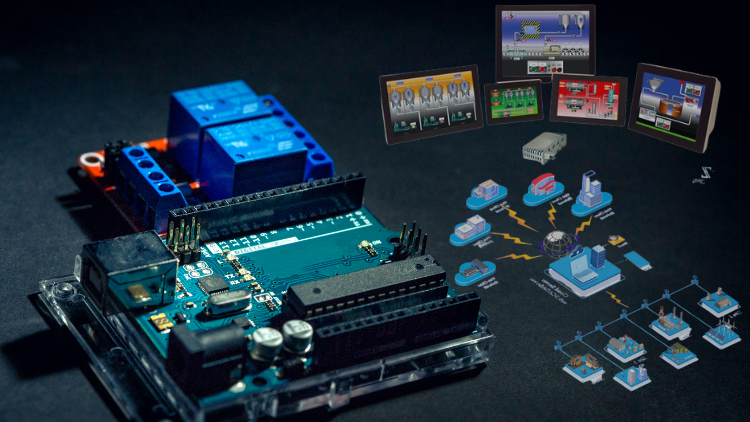
Pelajari SCADA secara praktis dengan mengembangkan antarmuka sendiri untuk berbagai sistem dan mengendalikan Perangkat Berbasis Arduino Anda.

ทุกระดับ • 28 บรรยาย • เข้าถึงได้ตลอดชีวิต
Educational Engineering Team

อาจารย์ผู้สอนที่ได้รับการรับรอง

Antarmuka Sistem SCADA dengan Arduino
รถพ่วง
พบกับผู้สอนของคุณ: Educational Engineering Team

19 ms

5.0 / 5.0
นักเรียนที่กระตือรือร้น
1
นักเรียนที่กระตือรือร้น
อังกฤษ - สหรัฐอเมริกา
คำบรรยาย 99 ภาษา
3 ชม. 38 นาที
เนื้อหาทั้งหมด

สิ่งที่คุณจะได้เรียนรู้

Create SCADA interfaces using various technologies allowing operators to interact with a live, running system.
Use the provided Arduino program as the basis for your interfaces.
Create a fully-functional graphical interfaces to monitor Arduino
Create a fully-functional graphical interfaces to interact with Arduino

เนื้อหาหลักสูตร

12 ส่วน • 28 การบรรยาย • 03:38:48 ความยาวรวม

Introduction

02:44

Introduction to SCADA

07:49

Functions and Alarms

09:36

SCADA system using Arduino with Free SCADA software

02:24
แผนการเรียนรายสัปดาห์
วางแผนการเรียนรู้ของคุณ
AI สร้างตารางเวลาส่วนตัวตามเวลาว่างของคุณ

ความต้องการ

Semua perangkat lunak yang diperlukan untuk kursus ini akan disediakan secara gratis dengan instruksi pemasangan dalam kuliah video

Sebuah Komputer / Laptop

กลุ่มเป้าหมาย

Anyone who want's to learn how to Control Arduino using a visualized Interface

Anyone who want's to control a device remotely or using a visual interface

Any Tech Geek who want's to know Arduino, SCADA and How to take full advantage of SCADA System design.

For those lacking the requisite knowledge to make the most of this course, my first course "Arduino Programming covers things you'll need.

เกี่ยวกับหลักสูตรนี้

Selamat datang di kursus ini.


Kami akan menjelaskan SCADA secara praktis dengan mengembangkan antarmuka sendiri untuk berbagai sistem dan mengendalikan Perangkat Berbasis Arduino Anda.


Dalam kursus ini, Anda akan menjadi akrab dengan SCADA dengan membuat antarmuka visual yang dapat Anda manfaatkan untuk menutupi prosedur otomatis, menunjukkan parameter operasi, dan bahkan mendapatkan data dari sistem yang sebelumnya dioperasikan dan bekerja.


Kami menjelaskan salah satu solusi yang paling biasa di dunia visualisasi. Dengan demikian, kami akan bekerja secara signifikan dengan teknologi tersebut.


Kami juga akan bekerja secara praktis dengan SCADA, dan pada akhir kursus ini, Anda akan mampu membuat sistem pemantauan, kontrol, dan akuisisi data yang berjalan penuh otomatis menggunakan Arduino.


Jadi bersiaplah untuk mulai mendesain dan membuat antarmuka SCADA pertama Anda dengan mudah dan efektif, dengan dukungan 24/7. Saya yakin Anda akan menikmati konten kursus ini. Sampai jumpa di dalam.


Apa yang akan Anda pelajari


  • Menulis kode Arduino sebagai dasar untuk antarmuka Anda.
  • Memproduksi antarmuka grafis yang berfungsi penuh untuk menutupi Arduino.
  • Membuat Kode Arduino yang berfungsi penuh untuk membaca sensor dan mengontrol output berdasarkan Antarmuka SCADA.
  • Menggunakan berbagai macam Elemen Grafis untuk mengendalikan berbagai macam perangkat.
  • Memahami prinsip kerja komunikasi antara Sistem SCADA dan Arduino.
  • Memproduksi antarmuka SCADA menggunakan berbagai teknologi yang memungkinkan operator untuk berinteraksi dengan sistem yang sedang berjalan.
  • Belajar berbagai metode untuk memprogram Arduino.


Siapa yang ditargetkan untuk kursus ini


  • Pemula yang tertarik untuk belajar sistem SCADA.
  • Hobbyis dan penggemar elektronika.
  • Mahasiswa dan profesional teknik yang ingin memperluas keterampilan mereka.
  • Semua orang yang tertarik pada integrasi Arduino dan SCADA.


Persyaratan


  • Pemahaman dasar tentang Arduino dan elektronika.
  • Board Arduino dengan periferal yang diperlukan.
  • Pengetahuan dasar pemrograman berguna tetapi tidak diperlukan.


Tentang Instruktur


Tim Pendidikan Teknik


Tim yang


Manfaat


Membuat antarmuka SCADA menggunakan berbagai teknologi yang memungkinkan operator untuk berinteraksi dengan sistem yang sedang berjalan.

Menggunakan program Arduino yang disediakan sebagai dasar untuk antarmuka Anda.

Membuat antarmuka grafis yang berfungsi penuh untuk memantau Arduino

Membuat antarmuka grafis yang berfungsi penuh untuk berinteraksi dengan Arduino

Membuat antarmuka grafis yang berfungsi penuh untuk mencatat data dari sensor menggunakan Arduino

Membuat Program Arduino yang berfungsi penuh

Memahami prinsip kerja Relay dan bagaimana mereka berinteraksi dengan Kontak

Membedakan antara Arduino dan PLC

Belajar berbagai metode untuk memprogram Arduino

โอกาสทางสายอาชีพและตำแหน่งงานเป้าหมาย

พัฒนาทักษะที่พร้อมใช้งานจริงเพื่อก้าวสู่ตำแหน่งงานระดับสากลที่มีความต้องการสูง

หลักสูตรพร้อมทำงานจริง
ตำแหน่งงานที่คุณสามารถสมัครได้

Embedded Systems Engineer

IoT Firmware Developer

Automation & SCADA Engineer

PCB & Circuit Layout Designer

ประมาณการเงินเดือนต่อปี
$85,000 – $135,000 / yr
ความต้องการในตลาดโลก

Top 5% Growing Engineering Segment

ทักษะสำคัญที่คุณจะเชี่ยวชาญ
Microcontroller Architecture
Hardware-Software Integration
Industrial Protocols & Fieldbus Comms
Schematic & Circuit Diagnostics
* การประมาณการอ้างอิงจากเกณฑ์การจ้างงานและรายงานเงินเดือนในอุตสาหกรรมเทคโนโลยีระดับสากล
พบกับผู้สอนของคุณ
Educational Engineering Team
5.0 เรตติ้ง
98 นักเรียน
ดูโปรไฟล์แบบเต็ม
Educational Engineering Team
อาจารย์ผู้สอนหลัก
Educational Engineering Team is a Leading Team in Microcontroller Industry, with over 13 Years of Experience in Teaching and Doing Practical Projects.

Educational Engineering Team is a group of skilled engineers dedicated to sharing practical knowledge with learners worldwide. Founded by Ashraf Said Al-Madhoun, the team has worked in programming, microcontrollers, electronics, and engineering education since 2007.

Rather than offering superficial explanations, the team breaks down complex topics into clear, step-by-step lessons supported by practical projects and bite-sized videos. This hands-on approach helps learners understand technical concepts and apply them directly to their studies, careers, and personal projects.

Ashraf is a Mechatronics Engineer, educator, author, electronics and programming enthusiast, and maker. As Chief Educational Engineer, he specializes in explaining challenging concepts in a simple, structured, and accessible way. He has extensive teaching experience and has authored four books about microcontrollers.

Educational Engineering Team has created more than 100 online courses covering circuit design, electronics simulation, PCB fabrication, Arduino, PIC microcontrollers, Raspberry Pi, C, Python, PLC programming, industrial automation, 3D design, ESP boards, embedded systems, and the Internet of Things.

In addition to producing courses, bootcamps, articles, and tutorials, the team supports electronics and programming enthusiasts, STEM students, educators, and aspiring engineers. Its members also provide engineering consultation and guidance for student graduation projects, helping learners develop practical skills and prepare for careers in the technology industry.

...
คอร์สอื่น ๆ โดย
Educational Engineering Team

นักเรียนก็ซื้อด้วย

ผู้เรียนที่ดูหลักสูตรนี้ได้ลงทะเบียนเรียนในหลักสูตรที่ได้รับคะแนนสูงสุดเหล่านี้ด้วย

Program ESP32 without Coding
ฟรี
กำลังมาแรง
ไอทีและซอฟต์แวร์ | ฮาร์ดแวร์

Program ESP32 Board without writing a single code in A Professional Environment

5.0
2 ชม. 30 นาที
18 การบรรยาย
ทุกระดับ
Using Al to Code: Your Step-by-Step Guide
ไอทีและซอฟต์แวร์ | ฮาร์ดแวร์

Revolutionize Your Coding Skills with Al: A Comprehensive Guide for Beginners

5.0
2 ชม.
11 การบรรยาย
ทุกระดับ
$10.99

$19.99

ISO 27001 Certification Process – A Step-by-Step Guide
ไอทีและซอฟต์แวร์ | ความปลอดภัยของข้อมูล

Master ISO 27001: Achieve Certification, Build Security, and Ensure Compliance for Your Organization

5.0
1 ชม. 30 นาที
10 การบรรยาย
ระดับเริ่มต้น
$39.99

$54.99

Implement GRC (Governance, Risk, Compliance) Step by Step
ไอทีและซอฟต์แวร์ | ได้รับการรับรองด้านการกำกับดูแล ความเสี่ยง และการปฏิบัติตามกฎระเบียบ (CGRC)

Master GRC: Step-by-Step Guide to Implementing Governance, Risk, and Compliance for Business Success

5.0
2 ชม. 30 นาที
35 การบรรยาย
ระดับกลาง
$39.99

$64.99

Mastering Arduino Data Streaming to Excel
ไอทีและซอฟต์แวร์ | อาร์ดูโน่

Seamlessly Stream and Visualize Real-Time Data from Arduino into Excel with Ease

5.0
1 ชม. 30 นาที
6 การบรรยาย
ทุกระดับ
$9.99

$34.99

Blogger: Make A Professional Website For Free With No Coding
ไอทีและซอฟต์แวร์ | ไอทีและซอฟต์แวร์อื่นๆ

Learn how to create and customize a website with no prior coding experience.

5.0
1 ชม. 30 นาที
12 การบรรยาย
ทุกระดับ
$9.99

$19.99

Frequently Bought Together

Learners who enrolled in this course also frequently purchased these complementary courses together.

7-Day Money Back Guarantee for all bundle items
Antarmuka Sistem SCADA dengan Arduino
This course:
สินค้าขายดี
Antarmuka Sistem SCADA dengan Arduino
$34.99
Using Al to Code: Your Step-by-Step Guide
Using Al to Code: Your Step-by-Step GuideEducational Engineering Team
$19.99

Total price for selected items:

$87.98

$109.97

🎉 Save 20% when bought together

คำถามที่พบบ่อย

ค้นหาคำตอบของคำถามที่พบบ่อยเกี่ยวกับหลักสูตรนี้

ใช่! เมื่อเสร็จสิ้นการบรรยายและการมอบหมายหลักสูตร 100% คุณสามารถดาวน์โหลดใบรับรองการสำเร็จหลักสูตรดิจิทัลที่ผ่านการตรวจสอบแล้วได้ทันทีจากโปรไฟล์ Lucebra ของคุณ

สำรวจเพิ่มเติมใน Technology

ต่อยอดการเรียนรู้ของคุณด้วยใบรับรองที่ผ่านการรับรอง อีบุ๊กที่เกี่ยวข้อง และชั้นเรียนสดแบบอินเทอร์แอคทีฟ




