

Lucebra
Lucebra Besigheid
IT en Sagteware/Hardeware

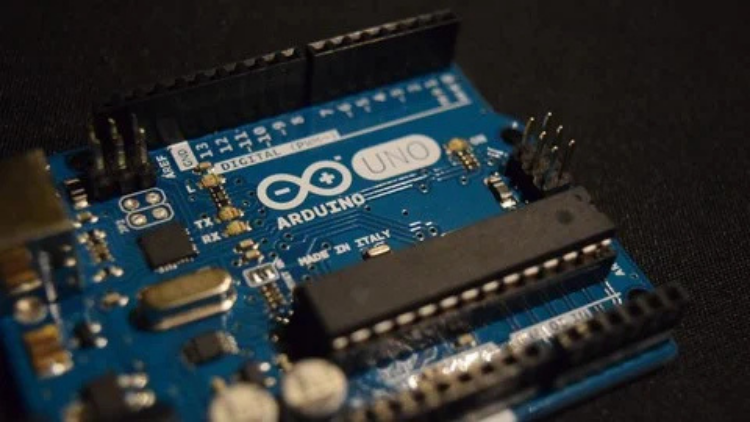
Design de PCB: Crie Arduino Nano usando Altium Designer

Aprenda design de Circuito Impresso criando Arduino Nano no Software Altium Designer.

Alle Vlakke • 29 Lesings • Lewenslange Toegang
Educational Engineering Team

Geverifieerde Meester Instrukteur

Design de PCB: Crie Arduino Nano usando Altium Designer
SLEEPWA
Ontmoet jou instrukteur: Educational Engineering Team

19 ms

5.0 / 5.0
Globale gradering
1
Aktiewe studente
Engels (Verenigde State van Amerika)
99 Tale Onderskrifte
4 uur 3 min
Totale inhoud

Wat jy sal leer

Crie e projete um Arduino Nano personalizado no Altium Designer
Desenhe o esquema de um Arduino Nano e conecte componentes
Crie seus próprios componentes personalizados e biblioteca de componentes
Compile o design, detecte e elimine erros de design

Kursusinhoud

10 afdelings • 29 lesings • 04:03:04 totale lengte

Introduction

02:21

Download and Installing Altium Designer

06:36

Altium Designer Interface Introduction

03:47

Create Component Symbol & Add Pins

09:46

Finishing the Schematic

12:47

Creating Your Componenets Symbol - Making Footpring and PCB Layout

11:43

Link footprint with Schematic Library

02:25

Adding the new Library File to your Design

03:01

Creating the Atmega Component Symbol

12:47

Creating the Atmega PCB Footprint

11:43

Adding Components and Placing them on Schematic

03:01

Adding Components Libraries

03:16

ATMEGA Schematic Connection

13:00

USB Connector Schematic

09:43

Header Pins for Nano Board

09:29

Adding Resistors LED Indicators Voltage Regulator

11:39

Annotating and Compiling Project

02:58
Weeklikse Studieplan
Beplan jou leerreis
KI skep n persoonlike skedule gebaseer op jou beskikbaarheid

Vereistes

Tempo, dedicação e paciência para aprender e implementar novos conhecimentos.

Um PC

Teikengehoor

Learn basic to intermediate PCB design

Have a tech kickstarter idea, that you want to get of the ground

Want to create your own custom Arduino Printed Circuit Board (PCB).

Want to get a job in PCB design

Oor hierdie kursus

>>> Aprenda design de Circuito Impresso criando Arduino Nano no Software Altium Designer. <<<


>>> Atualizações Contínuas <<<

Mais de 4000 ALUNOS!!! OBRIGADO!!!


O que os alunos estão dizendo:

Arshdeep Malik diz, "Excelente, muito útil, vale o dinheiro."

Zain Ul Haq diz, "Aprendi a trabalhar com o Altium Designer que antes eu percebia como um software complexo de usar. Depois de fazer este curso, estou confiante para trabalhar no Altium Designer."


Por que você deve fazer este curso?


  • Adquira as habilidades necessárias para se tornar um designer profissional de PCB.
  • Aprenda como projetar e layoutar suas próprias Placas de Circuito Impresso usando o software Altium Designer.
  • Crie Arduino Nano no software Altium Designer e depois construa-o em uma plataforma de desenvolvimento (placa Nano e Ferramenta de Desenvolvimento).
  • Comece, crie e edite com sucesso seus próprios projetos de layout de PCB no software Altium Designer.
  • Aprenda as ferramentas e técnicas mais recentes do setor para projetar Placas de Circuito Impresso (PCBs).
  • O curso é adequado para iniciantes que desejam adquirir as habilidades necessárias para se tornarem designers profissionais de PCB.


Bem-vindo a este curso.


Sobre o que é este curso:

Neste curso, você aprenderá do início ao fim, do zero à produção pronta, como projetar uma Placa de Circuito Impresso personalizada do Arduino Nano. Isso o ajudará a aprimorar suas habilidades de design de PCB, o que o ajudará a começar a trabalhar como freelancer ou a conseguir um emprego em design de PCB com o Altium Designer, já que é a ferramenta de design de PCB mais usada.


O que você deve esperar após fazer este curso:


  • Comece com design de PCB usando o Altium Designer.
  • Baixe e instale o Altium Designer.
  • Crie sua própria biblioteca de componentes para criar componentes que você não tem uma biblioteca, o que o ajudará a trabalhar como freelancer online, já que muitos trabalhos pedem para criar bibliotecas de componentes.
  • Crie o Esquema do Arduino Nano no Altium Designer.
  • Conecte componentes na visualização do Esquema.
  • Transfira o esquema para o PCB.
  • Coloque componentes na placa.
  • Crie uma placa multicamada.
  • Roteie camadas e coloque componentes na placa.
  • Roteie automaticamente para economizar tempo.
  • Elimine erros de design

Benefícios:

Crie e projete um Arduino Nano personalizado no Altium Designer

Desenhe o esquema de um Arduino Nano e conecte componentes

Crie seus próprios componentes personalizados e biblioteca de componentes

Compile o design, detecte e elimine erros de design

Defina a forma e o tamanho da placa

Roteie automaticamente para acelerar o processo de roteamento

Roteie a Placa de Circuito Impresso (PCB)

Elimine erros e reduza as iterações de fabricação da placa usando o verificador de regras de design


Loopbaangeleenthede & Teikenposte

Bou praktiese, werksgereed vaardighede en kwalifiseer vir gesogte poste wêreldwyd

Werkgereed Kurrikulum
Poste waarvoor jy kan aansoek doen

Embedded Systems Engineer

IoT Firmware Developer

Automation & SCADA Engineer

PCB & Circuit Layout Designer

Beraamde Jaarlikse Salaris
$85,000 – $135,000 / yr
Wêreldwye Bedryfsvraag

Top 5% Growing Engineering Segment

Sleutelvaardighede wat jy Bemeester
Microcontroller Architecture
Hardware-Software Integration
Industrial Protocols & Fieldbus Comms
Schematic & Circuit Diagnostics
* Skatting gebaseer op globale tegnologie-werwingsmaatstawwe en salarisverslae.
Ontmoet jou instrukteur
Educational Engineering Team
5.0 Gradering
98 Studente
Bekyk volle profiel
Educational Engineering Team
Hoofinstrukteur
Educational Engineering Team is a Leading Team in Microcontroller Industry, with over 13 Years of Experience in Teaching and Doing Practical Projects.

Educational Engineering Team is a group of skilled engineers dedicated to sharing practical knowledge with learners worldwide. Founded by Ashraf Said Al-Madhoun, the team has worked in programming, microcontrollers, electronics, and engineering education since 2007.

Rather than offering superficial explanations, the team breaks down complex topics into clear, step-by-step lessons supported by practical projects and bite-sized videos. This hands-on approach helps learners understand technical concepts and apply them directly to their studies, careers, and personal projects.

Ashraf is a Mechatronics Engineer, educator, author, electronics and programming enthusiast, and maker. As Chief Educational Engineer, he specializes in explaining challenging concepts in a simple, structured, and accessible way. He has extensive teaching experience and has authored four books about microcontrollers.

Educational Engineering Team has created more than 100 online courses covering circuit design, electronics simulation, PCB fabrication, Arduino, PIC microcontrollers, Raspberry Pi, C, Python, PLC programming, industrial automation, 3D design, ESP boards, embedded systems, and the Internet of Things.

In addition to producing courses, bootcamps, articles, and tutorials, the team supports electronics and programming enthusiasts, STEM students, educators, and aspiring engineers. Its members also provide engineering consultation and guidance for student graduation projects, helping learners develop practical skills and prepare for careers in the technology industry.

...

Studente het ook gekoop

Leerders wat hierdie kursus bekyk het, het ook vir hierdie top-gegradeerde kursusse ingeskryf

Program ESP32 without Coding
GRATIS
IT en Sagteware | Hardeware

Program ESP32 Board without writing a single code in A Professional Environment

5.0
2 uur 30 min
18 lesings
Alles
GRATIS
Begin nou
Using Al to Code: Your Step-by-Step Guide
IT en Sagteware | Hardeware

Revolutionize Your Coding Skills with Al: A Comprehensive Guide for Beginners

5.0
2 uur
11 lesings
Alles
$10.99

$19.99

ISO 27001 Certification Process – A Step-by-Step Guide
IT en Sagteware | Inligting Sekuriteit

Master ISO 27001: Achieve Certification, Build Security, and Ensure Compliance for Your Organization

5.0
1 uur 30 min
10 lesings
Beginner
$39.99

$54.99

Implement GRC (Governance, Risk, Compliance) Step by Step
IT en Sagteware | Gesertifiseer in bestuur, risiko en nakoming (CGRC)

Master GRC: Step-by-Step Guide to Implementing Governance, Risk, and Compliance for Business Success

5.0
2 uur 30 min
35 lesings
Intermediêr
$39.99

$64.99

Mastering Arduino Data Streaming to Excel
IT en Sagteware | Arduino

Seamlessly Stream and Visualize Real-Time Data from Arduino into Excel with Ease

5.0
1 uur 30 min
6 lesings
Alles
$9.99

$34.99

Blogger: Make A Professional Website For Free With No Coding
IT en Sagteware | Ander IT & Sagteware

Learn how to create and customize a website with no prior coding experience.

5.0
1 uur 30 min
12 lesings
Alles
$9.99

$19.99

Frequently Bought Together

Learners who enrolled in this course also frequently purchased these complementary courses together.

7-Day Money Back Guarantee for all bundle items

Total price for selected items:

$87.98

$109.97

🎉 Save 20% when bought together

Gereelde Vrae

Vind antwoorde op die mees algemene vrae oor hierdie kursus.

Ja! Nadat u 100% van die kursuslesings en opdragte voltooi het, kan u onmiddellik u geverifieerde digitale Sertifikaat van Voltooiing direk vanaf u Lucebra-profiel aflaai.

Verken meer in Tegnologie

Brei jou leerreis uit met geakkrediteerde sertifikate, e-boeke en interaktiewe regstreekse klasse.



