

Lucebra
Lucebra Negosyo
IT at Software/Hardware/Arduino

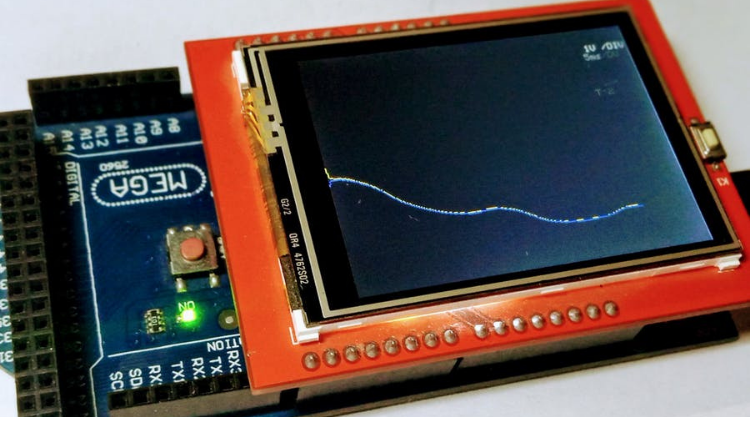
ออสซิโลสโคปเรียลไทม์บน Arduino

เรียนรู้และสนุกกับการฝึกฝน Arduino โดยการสร้างออสซิโลสโคปเรียลไทม์บน Arduino ของคุณเองแบบทีละขั้นตอน

Lahat ng Antas • 17 Mga lektura • Panghabambuhay na Access
Educational Engineering Team

Na-verify na Master Instructor

ออสซิโลสโคปเรียลไทม์บน Arduino
TRAILER
Kilalanin ang iyong instructor: Educational Engineering Team

19 ms

5.0 / 5.0
Global Rating
1
Mga Aktibong Mag-aaral
Ingles (American)
99 Mga Subtitle na Wika
1 oras 17 min
Kabuuang Nilalaman

Ang matututuhan mo

เลื่อนระดับด้วยการสร้างออสซิโลสโคปเรียลไทม์บน Arduino
สร้างออสซิโลสโคปเรียลไทม์บน Arduino ของคุณเอง
เรียนรู้หลักการทำงานของออสซิโลสโคปเรียลไทม์
เชื่อมต่อสวิตช์และอุปกรณ์อื่น ๆ กับ Arduino

Nilalaman ng Kurso

8 na mga seksyon • 17 mga lektura • 01:17:56 kabuuang haba

Introduction

02:06

Educational Engineering Team - Who we are?

05:46

What is an Oscilloscope

02:23

How it works

02:08

Hardware and Software Requirements

01:40

Circuit Schematic

03:52
Lingguhang Plano ng Pag-aaral
Planuhin ang iyong paglalakbay sa pag-aaral
Ang AI ay lumilikha ng personalized na iskedyul ayon sa iyong oras

Mga kinakailangan

ประสบการณ์พื้นฐานในด้านอิเล็กทรอนิกส์

ประสบการณ์พื้นฐานใน Arduino

ความตั้งใจที่จะปฏิบัติ ไม่ใช่แค่ดูเท่านั้น

Target na Audience

Arduino Geeks

Electronics Geeks

Anyone Interested in Learning How Real-Time Oscilloscope works

Anyone Interested in Learning How to Output different Signals using Arduino Real-Time Oscilloscope

Tungkol sa kursong ito

ยินดีต้อนรับสู่คอร์สนี้


คอร์สนี้จะสอนคุณวิธีสร้างออสซิโลสโคปเรียลไทม์บน Arduino เองที่บ้านด้วยสวิตช์และส่วนประกอบบางส่วน คู่มือนี้จะนำคุณไปทำความเข้าใจทีละขั้นตอนว่าส่วนประกอบแต่ละอันคืออะไร ทำไมต้องใช้ ทำงานอย่างไร และวิธีการเชื่อมต่อ เริ่มต้นด้วยพื้นฐานของ Arduino และสิ้นสุดลงที่การแสดงข้อมูลบนออสซิโลสโคปเรียลไทม์


คุณจะเรียนรู้หลักการทำงานที่แท้จริงของออสซิโลสโคปเรียลไทม์ สิ่งที่ต้องเขียนโค้ด และวิธีการเชื่อมต่อ เขียนสาย และโค้ดส่วนประกอบทั้งหมดให้ถูกต้องเพื่อให้คุณสามารถปรับออสซิโลสโคปเรียลไทม์ใช้งานได้ด้วยปุ่มต่าง ๆ โดยแต่ละปุ่มจะส่งสัญญาณที่แตกต่างกันออกมา


เรียนรู้และสนุกกับการฝึกฝน Arduino โดยการสร้างออสซิโลสโคปเรียลไทม์บน Arduino ของคุณเองแบบทีละขั้นตอน


หลังจากคอร์สนี้ คุณจะสามารถสร้างออสซิโลสโคปเรียลไทม์บน Arduino เองที่บ้านได้ และคุณสามารถใช้งานหรือนำไปใช้กับแอปพลิเคชันใด ๆ ที่คุณต้องการ


การเชื่อมต่อทั้งหมดอธิบายไว้อย่างละเอียด และคุณสามารถเลือกระดับเสียงสำหรับสัญญาณแต่ละอัน และจำนวนปุ่มออสซิโลสโคปเรียลไทม์ที่จะใช้งานได้


ทำไมคุณควรเรียนรู้คอร์สนี้?


  • สร้างออสซิโลสโคปเรียลไทม์บน Arduinoที่ทำงานได้อย่างมีประสิทธิภาพและมีประสิทธิผล
  • สิ่งที่คุณจะเรียนรู้ในคอร์สนี้
  • วิธีการสร้างออสซิโลสโคปเรียลไทม์บน Arduino
  • วิธีจัดการเสียงและโทนด้วย Arduino
  • วิธีตั้งค่าการส่งผลลัพธ์ในออสซิโลสโคปเรียลไทม์
  • วิธีการเชื่อมต่อปุ่มกับ Arduino
  • วิธีที่ Arduino ทำให้ชีวิตของคุณง่ายขึ้น
  • วิธีการเขียนโปรแกรม เผาโค้ด และเชื่อมต่อ Arduino
  • เครื่องมือที่เหมาะสมที่คุณต้องการเริ่มทำโปรเจ็คต์ที่น่าทึ่ง


ลงทะเลทะเบียนวันนี้และเข้าถึงทันที:


  • บทเรียนวิดีโอที่ดูง่าย
  • กิจกรรมทางปฏิบัติ
  • แหล่งข้อมูลที่สามารถดาวน์โหลดได้
  • การสนับสนุนจากอาจารย์ระดับพรีเมียม
  • การเข้าถึงการอัปเดตคอร์สตลอดไป
  • การเข้าถึงชุมชนนักเรียนพิเศษของเรา


คืนเงิน 100%

Mga Oportunidad sa Karera at Target na Trabaho

Bumuo ng mga praktikal na kasanayan para sa trabaho at maging kuwalipikado sa mga prestihiyosong posisyon

Kurikulum na Handa sa Trabaho
Mga Trabahong Puwede Mong Aplayan

Embedded Systems Engineer

IoT Firmware Developer

Automation & SCADA Engineer

PCB & Circuit Layout Designer

Tinatayang Taunang Sahod
$85,000 – $135,000 / yr
Pangangailangan sa Pandaigdigang Merkado

Top 5% Growing Engineering Segment

Mga Pangunahing Kasanayang Matututunan Mo
Microcontroller Architecture
Hardware-Software Integration
Industrial Protocols & Fieldbus Comms
Schematic & Circuit Diagnostics
* Mga pagtatantya batay sa mga pamantayan sa pag-hire ng teknolohiya sa buong mundo.
Kilalanin ang iyong instruktor
Educational Engineering Team
5.0 Rating
98 Mag-aaral
Tingnan ang Buong Profile
Educational Engineering Team
Pangunahing Instruktor
Educational Engineering Team is a Leading Team in Microcontroller Industry, with over 13 Years of Experience in Teaching and Doing Practical Projects.

Educational Engineering Team is a group of skilled engineers dedicated to sharing practical knowledge with learners worldwide. Founded by Ashraf Said Al-Madhoun, the team has worked in programming, microcontrollers, electronics, and engineering education since 2007.

Rather than offering superficial explanations, the team breaks down complex topics into clear, step-by-step lessons supported by practical projects and bite-sized videos. This hands-on approach helps learners understand technical concepts and apply them directly to their studies, careers, and personal projects.

Ashraf is a Mechatronics Engineer, educator, author, electronics and programming enthusiast, and maker. As Chief Educational Engineer, he specializes in explaining challenging concepts in a simple, structured, and accessible way. He has extensive teaching experience and has authored four books about microcontrollers.

Educational Engineering Team has created more than 100 online courses covering circuit design, electronics simulation, PCB fabrication, Arduino, PIC microcontrollers, Raspberry Pi, C, Python, PLC programming, industrial automation, 3D design, ESP boards, embedded systems, and the Internet of Things.

In addition to producing courses, bootcamps, articles, and tutorials, the team supports electronics and programming enthusiasts, STEM students, educators, and aspiring engineers. Its members also provide engineering consultation and guidance for student graduation projects, helping learners develop practical skills and prepare for careers in the technology industry.

...
Iba pang mga Kurso ni
Educational Engineering Team

Bumili din ang mga estudyante

Ang mga mag-aaral na tumingin sa kursong ito ay nag-enroll din sa mga nangungunang kursong ito

Program ESP32 without Coding
LIBRE
Tendencia
IT at Software | Hardware

Program ESP32 Board without writing a single code in A Professional Environment

5.0
2 oras 30 min
18 mga lecture
Lahat
Using Al to Code: Your Step-by-Step Guide
IT at Software | Hardware

Revolutionize Your Coding Skills with Al: A Comprehensive Guide for Beginners

5.0
2 oras
11 mga lecture
Lahat
$10.99

$19.99

ISO 27001 Certification Process – A Step-by-Step Guide
IT at Software | Seguridad ng Impormasyon

Master ISO 27001: Achieve Certification, Build Security, and Ensure Compliance for Your Organization

5.0
1 oras 30 min
10 mga lecture
Baguhan
$39.99

$54.99

Implement GRC (Governance, Risk, Compliance) Step by Step
IT at Software | Certified in Governance, Risk and Compliance (CGRC)

Master GRC: Step-by-Step Guide to Implementing Governance, Risk, and Compliance for Business Success

5.0
2 oras 30 min
35 mga lecture
Intermediate
$39.99

$64.99

Mastering Arduino Data Streaming to Excel
IT at Software | Arduino

Seamlessly Stream and Visualize Real-Time Data from Arduino into Excel with Ease

5.0
1 oras 30 min
6 mga lecture
Lahat
$9.99

$34.99

Blogger: Make A Professional Website For Free With No Coding
IT at Software | Iba pang IT at Software

Learn how to create and customize a website with no prior coding experience.

5.0
1 oras 30 min
12 mga lecture
Lahat
$9.99

$19.99

Frequently Bought Together

Learners who enrolled in this course also frequently purchased these complementary courses together.

7-Day Money Back Guarantee for all bundle items

Total price for selected items:

$75.98

$94.97

🎉 Save 20% when bought together

Mga Madalas Itanong

Maghanap ng mga sagot sa pinakakaraniwang tanong tungkol sa kursong ito.

Oo! Sa pagkumpleto ng 100% ng mga lektura at takdang-aralin sa kurso, maaari mong agad na i-download ang iyong na-verify na digital na Sertipiko ng Pagkumpleto nang direkta mula sa iyong profile sa Lucebra.

Mag-explore Pa sa Technology

Palawakin ang iyong pag-aaral gamit ang mga kinikilalang sertipiko, e-book, at live interactive na mga klase.




